10:00 · Maya is collecting
Her birthday cake is ready. Open the handover to see the design and pickup details before she arrives.
Saturday starts with a wedding collection, sixty cupcakes and a customer asking for last year’s design. Open Today to see who’s collecting and what needs you. Open Customers to pick up where the conversation left off.
Explore a fictional order from first enquiry to collection.
It’s 9:30. Maya will be here at ten. Choose a role to see what the designer, manager or collection team needs to know.
Who is collecting next, and what needs my attention?
Her birthday cake is ready. Open the handover to see the design and pickup details before she arrives.
Nine areas, one record. Select any of them for why it matters, what it does and a closer look.
So nothing due waits for someone to remember.
Handovers, replies owed and work that needs you, first.
See why and how →So the cake you agreed is the cake you make.
Request, accepted quote and recorded payments in one record.
See why and how →Production runs on dates and stages, not memory.
Follow booked cakes from preparation to handover.
See why and how →A date isn’t free just because the diary looks empty.
Month, week, day and agenda, with holds, closed days and rescheduling.
See why and how →The request nobody answered is the one that goes quiet.
Enquiries ranked, with the reason beside each.
See why and how →A returning customer expects you to remember.
Every celebration and its recorded history.
See why and how →See how your studio moves over time.
Orders, enquiries and where your work comes from.
See why and how →Receipts shouldn’t wait for a quiet night.
Photograph one, review the suggestion, save it yourself.
See why and how →Your studio’s rules belong in one place.
Branding, enquiry form, payment instructions, terms and tax.
See why and how →Maya sees sugar flowers on social media and opens your gallery to see the finish up close. She taps Enquire and sends her date and servings straight to your studio’s Inbox, where the team can follow it through to collection.
Run every custom order from first enquiry to collection: Today, Orders, Kitchen, Calendar, Inbox and Customers in one record.
US$29 per studio per month.
A website made for your studio and built to be found. We handle the pages, the structure and the search groundwork, then connect your enquiry form so requests land in Tharu’s Inbox with the details and where they came from.
Built with you, one studio at a time. Not a self-serve builder.
Visitor traffic and campaign analytics are a separate scope. Website design is priced per project, separately from the US$29 studio subscription.
One fictional order, from first enquiry and calendar check through quote acceptance, deposit, Kitchen and handover, ending with Maya’s history.

The film is in production. It will play here, with captions, once it has been approved.
Maya has ordered here before. Her new enquiry arrives in her own words, and Tharu keeps them.
What the studio knows about her is written down, not assumed. Her nut-free note is there to check again.
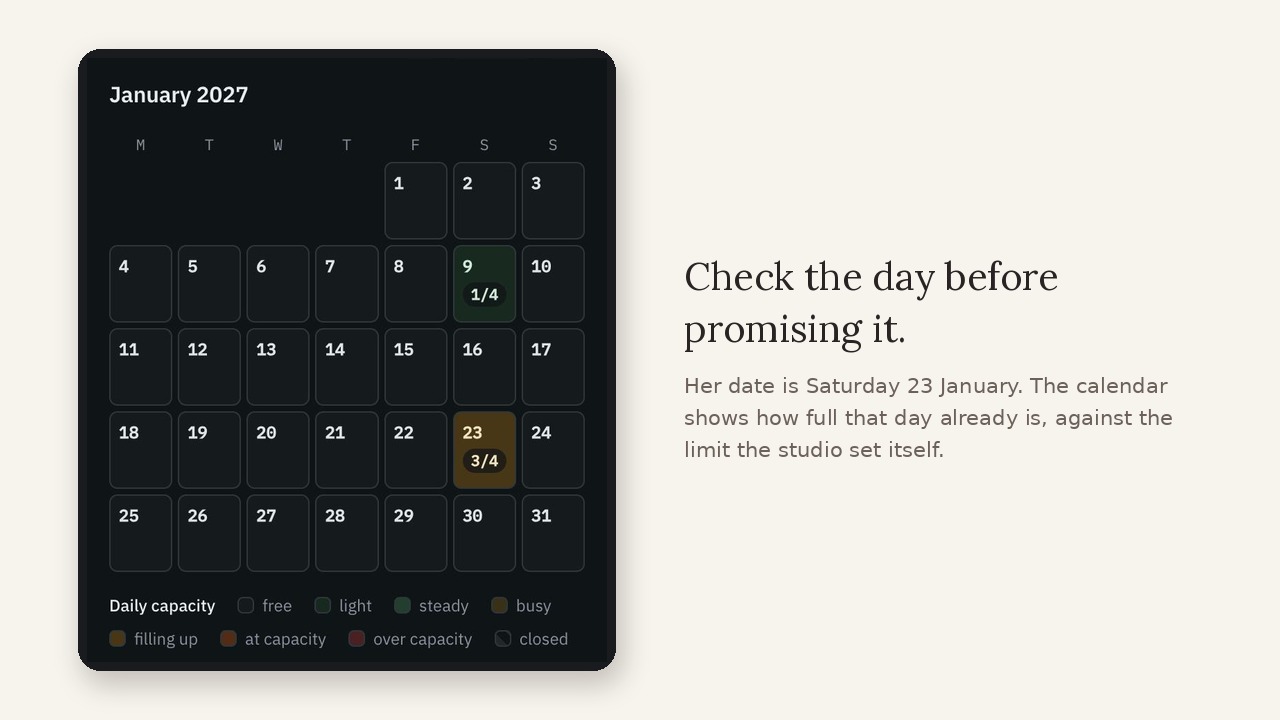
Before promising Saturday the twenty-third of January, the calendar shows how full that day already is.
The quote is built from what she actually asked for, and her price and deposit are clear.
Before sharing the quote, the baker reviews the message and checks the details.
Maya sees the whole agreement on her own link before she accepts.
She accepts. That version is the one that counts, and Tharu says what it has not verified.
The baker records the deposit against Maya's order, keeping the payment and agreement together.
Accepting is not booking. The studio confirms capacity, and writes down why the order is moving.
Booked — with the agreement, recorded deposit and booking note together.
Alongside future bookings, the kitchen keeps today's work in view.
For studio expenses, AI reads the receipt. The baker checks the details.
Her last cake, handed over. Her next one, booked.
Their next celebration. Your next chapter. Discover Tharu.
The film then shows Inbox, Orders, Kitchen and Today, and ends on the Tharu signup screen and card. Captions carry the same words.
Fictional studio and customer. Captions are on by default. The film shows what Tharu does today.

In Expenses, AI can suggest receipt details. Try it: the demo below is illustrative, and nothing here is saved anywhere.
We introduce AI gradually, one use at a time. Before adding another use, we ask three questions: can you trace the suggestion to its source, see what’s missing and correct it before saving?
Each request shows why it sits where it does: how close the event is, how long since anything happened, and whose move it is. A request nobody has answered goes first. It isn’t machine learning, and it doesn’t predict who will book.
Ideas under consideration, not promised features or dates. Priorities may change.
Tharu doesn’t move your money. It keeps what was agreed, what came in and what it cost in one record, so the figures you quote are the figures you work from.
Send a quote your customer opens and accepts from a link. Revisions are numbered, and the accepted version stays with the order.
Deposit and balance dates follow the accepted amount and your studio’s terms. Show the payment methods you use: Cash, Zelle, Venmo, PayPal or Cash App.
Log each payment against its order, with the method and confirmation. A recorded deposit is your record, not a bank receipt.
Review recorded costs and estimates on an order. Tharu marks missing or uncertain figures so you can see what still needs checking.
Maya’s order, fictional data. Customers pay through your bakery’s chosen method and your provider handles settlement. Availability of methods varies by country.
Your bakery handles its customer payments separately. Record what you receive against the order.
Tell us where your studio is based when you ask about guided setup.
This subscription pays for Tharu. What your customers pay you is your money: you record it against the order separately, and Tharu never takes a share of it.
Independent cake designers, pastry teams, studio owners and commercial celebration counters can all follow a custom order from enquiry to collection. For a supermarket department, the focus is its celebration orders; multi-store forecasting and replenishment are outside this workflow.
Open Today for handovers and work that needs your attention. From Maya’s collection, open the order to check the agreed design before she arrives.
Yes. Each celebration keeps its own date, design and stage. The customer profile brings those orders and their recorded history together.
Prospects helps you find people with an enquiry and no evidence of a booking. Where booking history is unclear, Tharu keeps that uncertainty visible.
Read the note on the order where it was recorded. Ask the customer to confirm requirements for each new celebration; a previous request cannot establish allergy status or safety.
Use Calendar to review bookings, active holds and closed days. Confirm the date with the customer once you have reviewed your studio’s workload.
Configure instructions for Cash, Zelle, Venmo, PayPal or Cash App where available. Receive payment through your chosen method, then record it against the order. Recording a deposit does not charge the customer. Card collection through Tharu is not switched on, so no card is taken here.
Customer reminders are manual. Your team decides when to follow up.
No. The Inbox is ordered by plain rules, with the reason shown beside each request. AI is used today in one place only: Expenses, to suggest receipt details that you check and save.
Calendar shows orders, holds and closed days, with Month, Week, Day and Agenda views, and lets you reschedule an accepted order. Staff task lists and task reminders aren’t part of Tharu yet.
Yes, as a separate service. Studio websites are built with you, one studio at a time, and connect to Tharu’s enquiry form. Tharu works without one.
Use guided setup to discuss your studio’s workflow. For questions, email hello@tharu.studio.
Tell us where you bake and how to reach you about setup.